

The simple way to Start a Minecraft Server
The simple way to get your Java or Bedrock Minecraft server up and running in minutes. No complicated setup with premium support and modpacks at no extra charge.
Start playing with friends today:
- One-Click Install Hundreds of Modpacks
- Expert Support Included with All Servers
- 24/7 Servers with 99.9% Uptime
- 7-Day Money Back Guarantee
The streamlined server hosting solution
Whether you’re starting a small server for friends or building a larger community, we keep things simple and transparent – what you see is what you get.
Install Modpacks in one click
Advanced DDoS protection
Automated server backups
Real-time support for questions
Unlimited player slots
No cost for add-on features
Playing Minecraft with your friends
has never been easier
- Choose RAM
- Configure your server
- Start playing
2GB Server
$7.49 first month
Recurring Price $9.99/mo
Billed Monthly
Great for simple servers & supports light plugins.
MOST POPULAR

4GB Server
$14.99 first month
Recurring Price $19.99/mo
Billed Monthly
Great for vanilla servers & supports light modpacks.
8GB Server
$29.99 first month
Recurring Price $39.99/mo
Billed Monthly
Great for all servers & supports most modpacks.
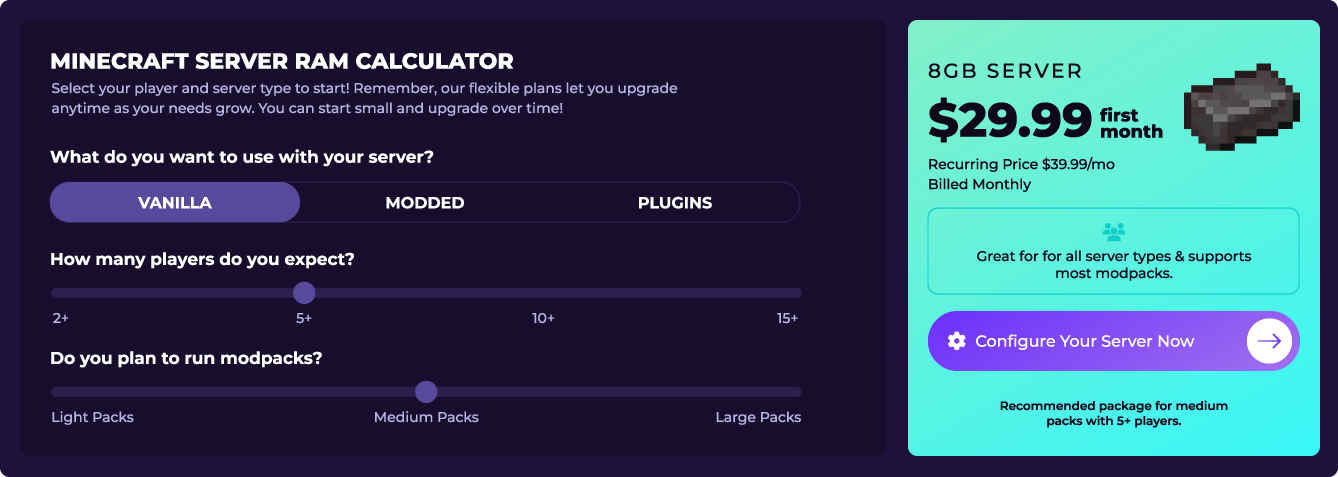
Not sure which server is best for your gaming needs?
Opt for the ideal plan that caters to your Minecraft server hosting requirements, relishing unrivalled service at unbeatable prices.
User-friendly control panel
Discover our powerful yet simple control panel – designed to make server management effortless. Start your Minecraft server today with instant access to modpacks, plugins, backups, and everything you need to create your perfect gaming experience.
Lightning-fast gameplay from anywhere
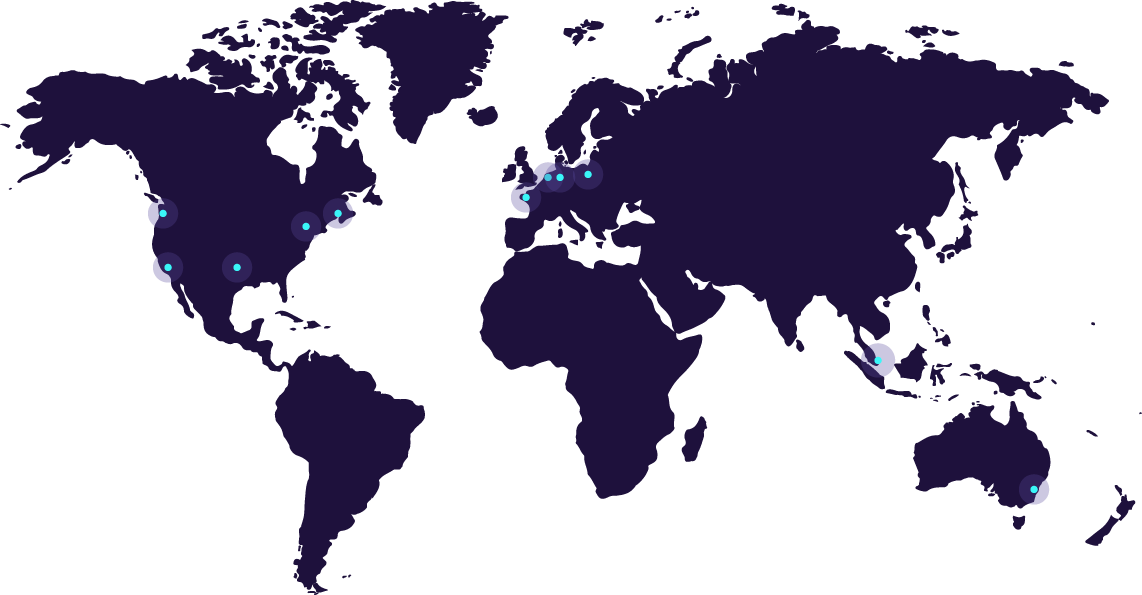
Choose from US, EU, and Asia servers for the best possible connection.
Test your Ping to determine where to host your server.
See what our customers say about their
SimpleGameHosting Minecraft server
See what our customers have to say about their Minecraft gaming experience with us:
Hundreds of Modpacks
All with One-Click Installation.
Frequently asked questions about
purchasing a Minecraft server
Why is SimpleGameHosting the best Minecraft server host?
We make hosting a Minecraft server simple. There are four main pillars that make us the best Minecraft server hosting company – the control panel, live chat support, our knowledge base, and our server hardware.
The SimpleGameHosting control panel is designed to be extremely easy to use and simplistic. It is where you will manage all aspects of your server from the console to adding mods, plugins, and installing modpacks.
We strive to have the best support team in the Minecraft server hosting industry. Our team is expertly trained to assist you with every aspect of your server. Think of them as a helping hand that are there to answer any questions you have. The SimpleGameHosting Knowledge Base is industry leading with in-depth text and video guides on every aspect of making a Minecraft server. No matter what your question or issue is, we strive to have a Knowledge Base article on it allowing you to have the best resource for it.
At SimpleGameHosting, we use high-end hardware that is meant for running Minecraft servers. This means that you are getting gaming focused hardware that can run even the most grueling Minecraft servers with as little lag as possible.
What type of Minecraft server hosting plans do you offer?
At SimpleGameHosting, we offer a variety of Minecraft server hosting plans for anyone wanting to simply set up a Minecraft Multiplayer Server.
Our plans include everything from basic server hosting to plans suited more towards larger-scale community servers. Additionally, we offer a Proxy server for someone looking to set up a Bungeecord server. The 4GB package is what we typically recommend for most players wanting a Vanilla server with a couple of players. For most modpacks, the 8GB server is usually the best option unless you’re installed heavy modpacks like ATM9 or similar. You can view all of our pricing and plans here or reach out to our Support Team for recommendations!
Do you offer modded Minecraft server hosting?
Yes, we offer modded Minecraft server hosting for modpacks and Forge/Fabric servers. You have complete control over your modded servers. You can add any individual mods you want.
We also offer one-click installations of modpacks for you to add to your server through our panel. To learn more about one-click modpack installations, view your help guides on our Knowledge Base.
Can I upgrade or downgrade my hosting plan at any time?
Yes! You can upgrade or downgrade your plan with us at any time. This can be done in our Billing Panel. While logged in to your account, you will be able to see all of the services you have hosted through SimpleGameHosting. From here, you can select the package you want to upgrade or downgrade. If you want to learn more about upgrading and downgrading Minecraft Server Hosting plans, view our Knowledge Base.
How much RAM and storage is included in each hosting plan?
Each Minecraft server at SimpleGameHosting appeals to the diverse needs of different players. All of our plans included unlimited storage, so you don’t have to worry about running out of storage space. The biggest difference in each plan is the amount of RAM dedicated to the servers.
Our basic Multiplayer server is the 2GB option, which is a great option for Bedrock servers or a small Java server running Paper/PurPur with up to two players. If you’re looking for a bit more power, our 4GB server is the most popular option and best suited for the majority of players without modpacks. For most modpacks, we recommend a minimum of 6GB for smaller packs, but a large amount of packs now need 8+GB to run smoothly. For the smoothest experience with most modpacks, we recommend at least 8GB.
We offer a variety of different plans to help with your hosting needs. From a Proxy Server for hosting Bungeecord to our Alpha Server, which features 16GB of RAM, dedicated cores, and a dedicated IP. To see all of our plans, view our pricing page.
What server locations are available for Minecraft hosting?
Currently, we have servers located in the US and France. New locations will be added as required by demand. The current locations are: Vint Hill, Virginia (NA East 1) , Miami, Florida (NA East 2), Dallas, Texas (NA Central), Hillsboro, Oregon (NA West 1), San Jose, California (NA West 2), Gravelines, France (EU West 1), Amsterdam, Netherlands (EU West 2), and Sydney, Australia (OC Aus). When new locations are added, we will update this section as well as the homepage, which lists all of our Global Locations. If you want to view the status of our servers, check out the status page.
You can also view the hardware we have in each location on the hardware specifications page.
How do I transfer my existing Minecraft server to your hosting service?
You can transfer to SimpleGameHosting from any other Minecraft server host. This can be done by downloading your server files from your current host. Usually, this can all be done via FTP or SFTP depending on what the Minecraft server host you are switching from supports.
Once you have downloaded your server files, you can upload them to your SimpleGameHosting server via SFTP.
It is worth noting that the IP address will need to be changed in the server.properties file on your server when you transfer it.
If you delete your server.properties file, one will generate with the correct information. Doing so though will require you to make any previous changes to your server.properties file again.
If you do have any questions about moving your server to SimpleGameHosting, feel free to reach out to our support team.
Can I install Paper, Spigot, or Forge on my hosted server?
Yes, we support Paper, Spigot, Forge, Fabric, PurPur, and more. These can be easily installed via our panel, and once they are up and running, you can add plugins and mods to your server.
We have in-depth guides on setting up each type of server in our Knowledge Base, as well as how to add mods and plugins to them.
How do I install and manage plugins or mods on my Minecraft server?
Plugins and mods can be installed using the File Manager via our control panel or SFTP.
This will allow you to install any Minecraft plugins or Minecraft mods that you want as long as it is for the same version of Minecraft as your server.
We have guides on adding plugins and mods to your server in our Knowledge Base. If you are more interested in modpacks, we have one-click installation of hundreds of modpacks allowing for easy setup.
What kind of support is available for server setup and management?
We have expert live chat and ticket support that you can reach out to at anytime. We encourage you to do this if you have any questions or issues with your server so we can guide you on fixing any issues.
As far as managing your server goes, this can be done via our Control Panel. Mods and plugins can be added here. It is also where you will find your server’s IP, console, SFTP settings, and other details.
Can I set up automatic backups for my Minecraft server?
Yes! Automatic backups can be enabled for your server in the panel! This is something we recommend for every server, but we ultimately leave the choice up to you if automatic backups are something you want to enable.
We have in-depth guides on automatic backups for your Minecraft servers on our Knowledge Base.
Do you offer DDoS protection for Minecraft servers?
Yes, we offer industry leading DDoS protection on all of the servers that we offer.
This all happens behind the scenes and is completely taken care of by us meaning that you never have to worry about your DDoS protection.
Do you support Bedrock servers?
Yes, at SimpleGameHosting we support both the Bedrock and Java editions of Minecraft.
To create a bedrock server, simply select the “bedrock“ option at checkout or contact us.
Faster setup for more play
A simple Minecraft server experience, whether you’re running mods or exploring in vanilla. Start your Minecraft server today in just minutes.